Stay right with payroll rules
Timesheets that split overtime by your state's rules
Weekly timesheets from the crew's clock, overtime warnings, approval with an audit trail, and a payroll CSV any provider can map.
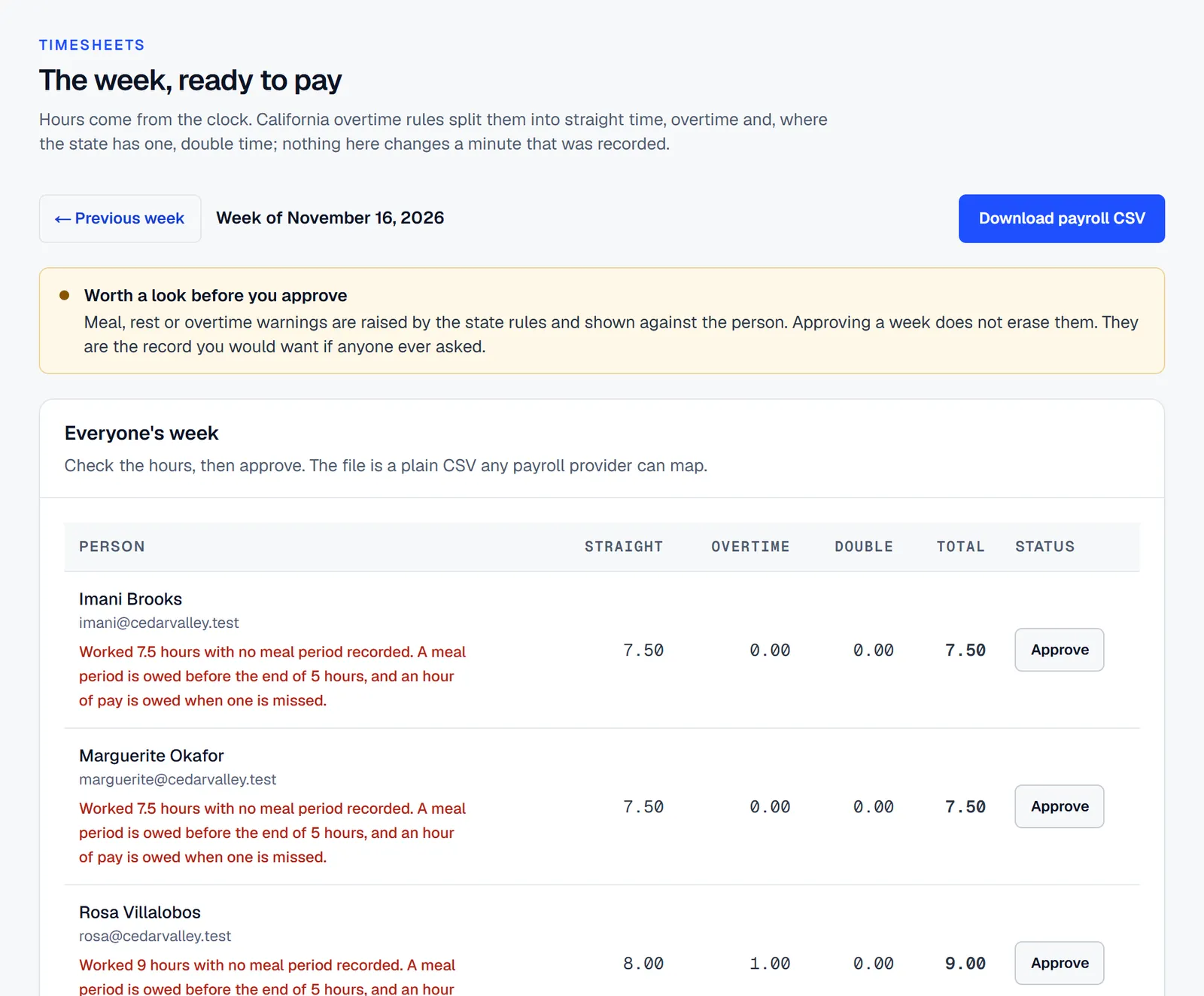
Timesheets turn the crew's clock-ins into a week of regular, overtime and double-time hours using the rules the product models: federal weekly overtime, plus the daily rules in California, Alaska and Colorado. Arbon checks meal and rest warnings on the day, records who approved the week, and exports a payroll CSV. It never edits anyone's hours.
Why it matters
Overtime rules nobody can recite.
A long day in California is not the same as a long day in Texas. A missed meal break can be an hour of pay, and nobody notices until a claim arrives. The owner is asked to sign a timesheet they cannot check, and the payroll provider gets hours nobody is sure about.
How it works
The mechanism, step by step.
Each step is a rule the product enforces, so nobody has to remember a setting.
- 01
The clock records what happened
Each clock-in and clock-out is stamped on the crew's phone, with the site and the break records. The product does not round a shift into a tidier number.
- 02
The week is split
Regular, overtime and double-time hours are worked out from the state's thresholds, without counting a premium hour twice for the weekly rule.
- 03
Warnings arrive on the day
A missed or late meal period, a short meal period and missing rest periods are raised against the shift. A person decides what to do about it.
- 04
A manager approves the week
Approval records who signed off and when. Employees cannot open the approval screen or change their own rate.
- 05
The CSV goes to payroll
Regular, overtime and double-time hours in separate columns, for any provider. The product does not run payroll or file anything.
The details
Facts you can check.
Each figure is a limit or a rule in the product today. Where a rule is not modeled, the page says so.
- The product splits and warns, a person decides
- Never edited
- Daily overtime rules modeled on top of the federal week
- CA, AK, CO
- Who signed the week and when
- Approved
- Regular, overtime and double time, ready for any provider
- CSV
Next
The parts that sit beside it.
Every feature shares one record, so a visit that starts on the schedule is the same visit that ends on the invoice and the timesheet.
Free: what an hour really costsQuestions
The questions this page raises.
Does Arbon run payroll or file taxes?
Which states have daily overtime rules here?
Does it ever shorten a shift to avoid overtime?
60 days free, no card, and every crew member included. The sample business used in the frames is fictional and labelled wherever it appears.
The next step
Put one real week in it.
A schedule, a crew on their phones and one invoice from the visit. That is enough to know whether it fits.
No card. Cancel from settings.